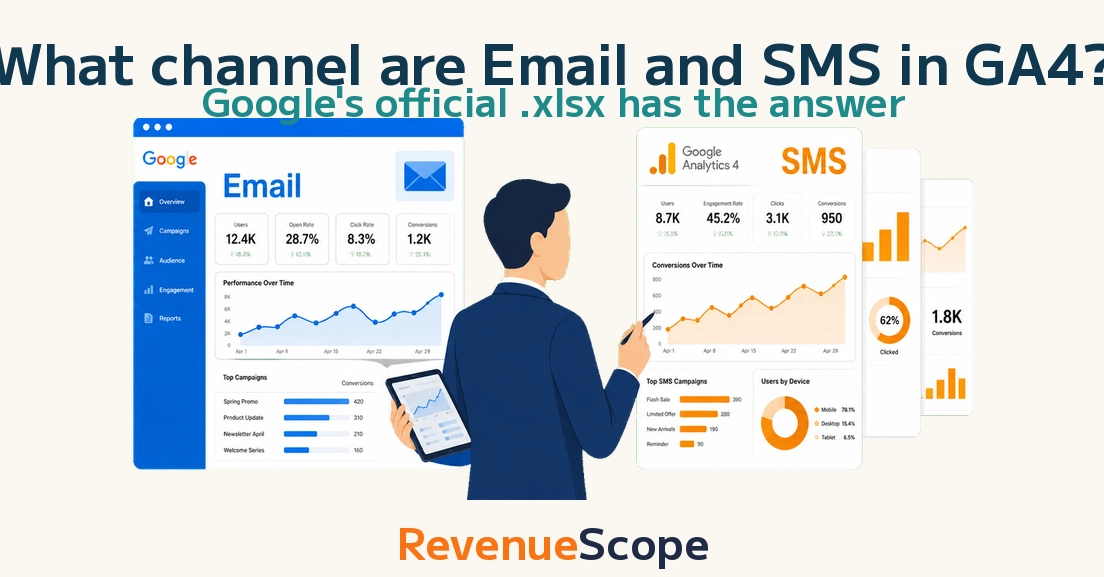
The topic What channel are Email and SMS in GA4 — Google’s official spec has the answer is currently the subject of lively discussion — readers and analysts are keeping a close eye on developments.
This is taking place in a dynamic environment: companies’ decisions and competitors’ reactions can quickly change the picture.
Posted on May 18
• Originally published at revenuescope.jp
If you ask five marketers what channel Email, SMS, and Mobile Push land in inside GA4, you will get five different guesses. “Probably Referral, or (other)?” is the most common answer.
But there is no guesswork involved. GA4 has an official Default Channel Group spec that decides exactly which of the 23 channels every visit gets classified into, based on the utm_source and utm_medium values. Google publishes the full logic, and operators cannot override it on the default report.
In this post, I decode the official Email, SMS, and Mobile Push judgement rules straight from the public documentation, so you stop guessing and start naming UTMs correctly on the first try.
GA4’s Default Channel Group is a system that classifies each visit by looking at the combination of utm_source and utm_medium and matching them against an official rule set. You cannot rename channels in the report UI. You can build a separate custom channel group, but the default 23-channel logic is locked down by Google.
This post focuses on the first file. The second one is covered in the sibling utm_source post I wrote separately.
Here is the full list of 23 channels GA4 currently defines. Email, SMS, and Mobile Push are the three most commonly misclassified despite being the ones operators design UTMs for most actively.
GA4 keeps the channel logic centralized so reports stay comparable across companies and industries. If every operator could redefine “Email” or “Referral” on their own report, no benchmark study, no GA4 official guide, and no third-party tutorial would work consistently. Custom channel groups exist precisely to handle company-specific views without polluting the shared 23-channel definition.
One common misconception is that channel classification is “GA4 trying to guess what the traffic is”. It is not guessing — it is running a fixed rule set against your UTM values. If the rule does not match, the traffic falls into Unassigned. That is a UTM naming problem on the sender side, not a GA4 detection failure.
Email — Source matches “email|e-mail|e_mail|e mail” OR Medium matches “email|e-mail|e_mail|e mail”
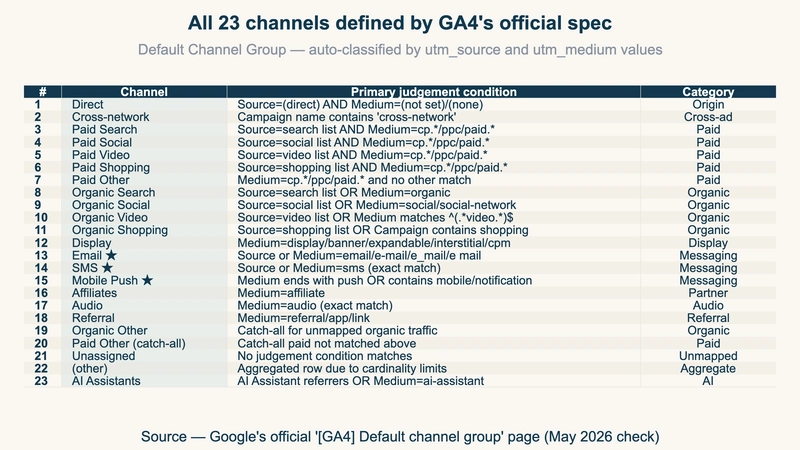
utm_source and utm_medium are joined by an OR, so satisfying either side is enough. Four spellings are accepted (email, e-mail, e_mail, e mail) — hyphen, underscore, and space variants all pass.
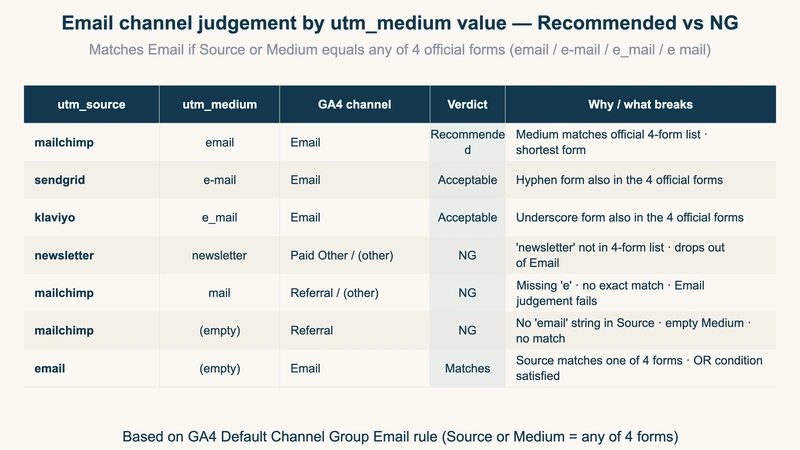
If you want to keep utm_source as the ESP name (mailchimp, sendgrid, klaviyo) for internal segmentation, always pair it with utm_medium=email so the Medium side condition fires.
Here is how common utm_medium values get classified by GA4’s Email rule on one chart.
SMS — Source exactly matches “sms” OR Medium exactly matches “sms”
Unlike Email, this is an exact match. Any other spelling — including SMS with uppercase letters — fails. GA4 stores values case-sensitively, so utm_source=SMS will not match.
It is tempting to lump every messaging channel together, but GA4’s SMS definition only reacts to the literal string sms. Putting utm_source=line or utm_source=whatsapp will not trigger SMS classification — they land in Referral or Organic Social depending on the Source Categories table.
“We want to see LINE Official Account clicks alongside SMS as a messaging cluster” is a common request that the default channel group cannot satisfy. The practical workarounds are: (a) create a custom channel group, or (b) keep SMS as its own channel and track LINE separately inside Referral by filtering on utm_source=line.
Here is the recommended SMS UTM format and the values that pass or fail the SMS rule.
Outside of Email and SMS, the channels where operators most often craft UTMs by hand are Display, Mobile Push, Affiliates, and Audio. Here is the official judgement rule for each one on a single reference chart.
Mobile Push is the most flexible — it has 3 OR conditions, so utm_medium=web-push, utm_medium=mobile-app, or utm_source=firebase all qualify independently. If you send from a web push notification tool, drop one of those into utm_medium and you are covered.
Once you know the spec, here is how to audit your own GA4 property:
If Unassigned plus (other) is over 5 percent of sessions, you almost certainly have inconsistent UTM naming across campaign owners.
Decoding the official spec is great, but what operators actually want to know is which channel is driving revenue. The 1,000 Email-classified sessions are interesting only when you can also see how many converted and what the average order value was. Without that, the channel report stays a vanity metric.
GA4 is built to measure the traffic side — sessions per channel. I’m building a tool called RevenueScope that approaches this from the opposite direction: revenue first, then trace back to the channel. It complements GA4 rather than replacing it. Once your UTMs are classified correctly inside GA4, the same values flow into RevenueScope and show up as Revenue Per Session (RPS) and Average Order Value (AOV) per channel — so Email, SMS, and Mobile Push contribution to the bottom line lives on one screen.
The point is: “classify correctly” is step one of two. Step two is connecting that classification to revenue per session. A channel report that ends at session count tells you what happened. A channel report that goes through to revenue tells you what to do next — which channel deserves more budget next month, and which one is wasting impressions despite high session volume.
What does your team’s UTM convention look like for Email and SMS? Are you seeing meaningful volume in Unassigned or (other) on the GA4 channel report? Drop a comment below — curious how others are handling the LINE / WhatsApp grey zone in particular.
Templates let you quickly answer FAQs or store snippets for re-use.
Are you sure you want to hide this comment? It will become hidden in your post, but will still be visible via the comment’s permalink.
For further actions, you may consider blocking this person and/or reporting abuse
Thank you to our Diamond Sponsors for supporting the DEV Community
Google AI is the official AI Model and Platform Partner of DEV
DEV Community — A space to discuss and keep up software development and manage your software career
Built on Forem — the open source software that powers DEV and other inclusive communities.
We’re a place where coders share, stay up-to-date and grow their careers.